
 Already ticked when you log
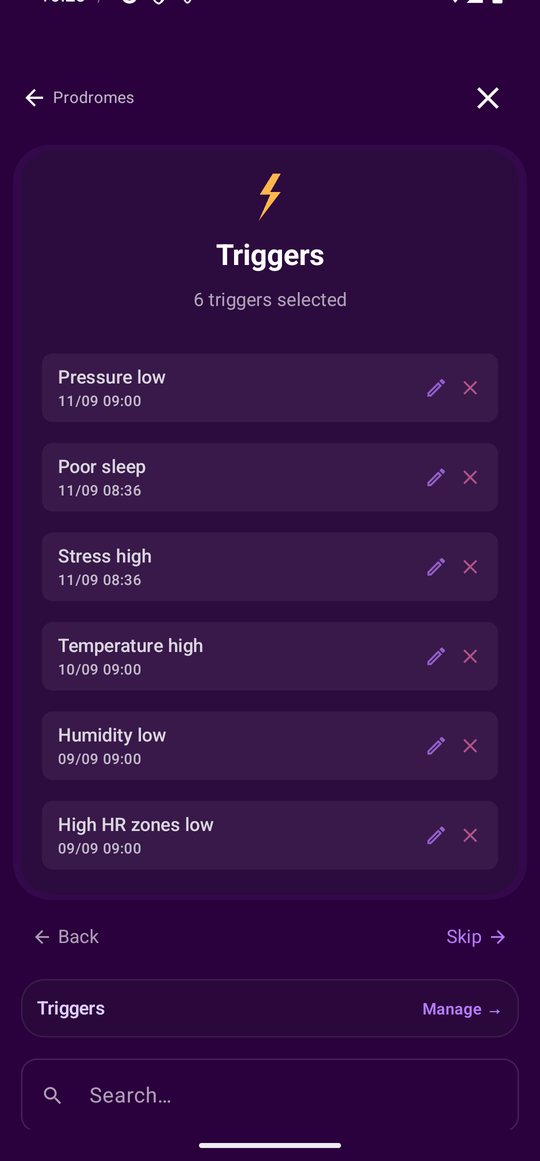
When you log a migraine, the trigger step does not start empty. Every trigger recorded in the three days before that attack, whether you tapped it in or the app detected it, is selected for you, each carrying the time it was recorded and a note of how many days before the attack it was. You untick anything that does not belong and move on.
It is per attack, not per day, so a migraine you backdate to last Tuesday gets the triggers from the days around last Tuesday, not from this week. Quick logging a single trigger skips the suggestions entirely, because there is no attack to hang them on.
 What your phone reports on its own
Screen time and late-night use come from your phone's usage statistics once you grant access. Ambient noise comes from the microphone. Sleep can come from the phone too: the longest screen-off gap of the night is read as your sleep, so even without a wearable your nights are in the data.
 From your calendar, one tap to confirm
With calendar access, workouts and yoga are picked up from your events, and stress-heavy meeting days are spotted. Each one is a single tap to confirm or skip. The access is read-only and nothing is ever written back.
A catalogue of a hundred triggers, plus yours
The app ships with a catalogue across sleep, environment, diet, body, cognitive, physical and menstrual cycle, and many of them fire automatically when your data crosses a line: pressure low, bedtime late, steps low, stress high, UV index low, thunderstorm days, jet lag. Anything else you can add in your own words, and a custom trigger gets the same correlation statistics as a built-in one.
Where it lives in the app
Three places. The trigger step of a migraine log, where the last three days arrive already ticked with the time each one was recorded. Manage Items, which holds the whole catalogue with the severity you gave each trigger. And Monitor, where the graphs the detections come from live, so you can see the night or the pressure drop that produced the tick.
What it needs from you
A set of optional permissions, each earning its keep: usage access for screen time and for reading sleep from the phone, the microphone for ambient noise, calendar access for workouts and heavy days, location for weather. All read-only, nothing written back, and anything you skip simply leaves that trigger empty rather than breaking the rest.