
 Set it up once
Log your period dates and the app predicts the next one and counts the days until it. Menstruation and ovulation are triggers in their own right, with a severity you set like any other.
 The menstruation risk curve
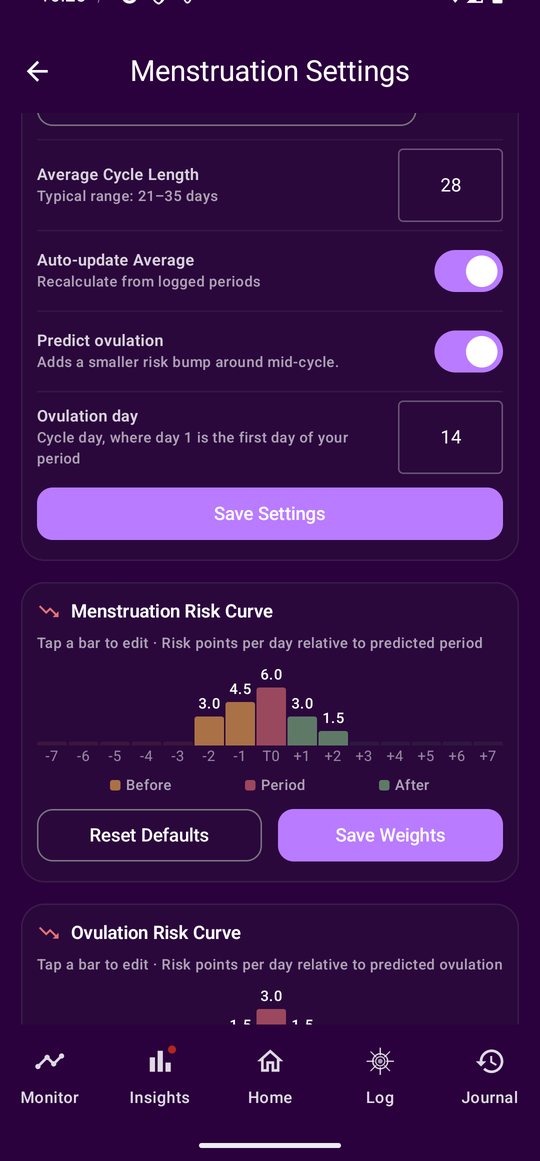
The curve is risk points per day relative to your predicted period: the days before, the period itself, and the days after. Tap a bar to edit a weight or reset the whole curve to the defaults. Those weights feed straight into the daily score and the 7-day outlook, which is why the days around your period appear in the forecast ahead of time.
 In your history, and shared on your terms
Monitor has a Menstruation graph with your attacks laid over the cycle. Period dates and cycle settings are their own consent item, so a practitioner sees them only if you say so.
Where it lives in the app
Menstruation Settings holds the prediction — last period, predicted date, cycle length, ovulation day — and both risk curves. Each curve is a row of bars, one per day relative to the predicted date, before, during and after, and a tap edits a weight or resets the whole thing to the defaults. Monitor → Menstruation keeps the history with your attacks laid over the cycle.
What it needs from you
Your period dates. Nothing else, and nothing at all if you would rather not: it is a question during setup and a switch in Settings, and off means off. Period dates and cycle settings are their own consent item, so a practitioner sees them only if you tick that box.